To cross post on social media, publish the same idea to more than one network as separate posts, each adjusted to fit where it lands. That is not the same as reposting, which shares a post that already exists inside the network it was published on.
This guide separates the two, lists what to change for each network, and shows how TrackMedia's Crosspost feature does the copying for you, including the one real limit it has today: only Bluesky can be watched as a source.
What is cross posting on social media?
Cross posting is publishing one idea in several places. You write it once, then each network gets its own post.
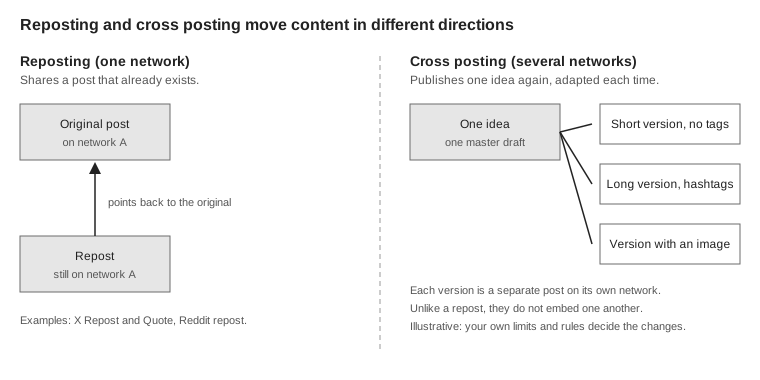
The word is used loosely, which is where confusion starts. Reddit's Help Center says "Reposting, formerly known as crossposting" takes a post from one community and shares it with another, and that the repost includes a preview of the original post with its username, community and upvote score. That is sharing within one network, so by the definition in this guide it is a repost. Our guide to crossposting on Reddit covers that meaning.
How is cross posting different from reposting?
A repost stays on one network and points at the original. X's Help Center describes a Repost as sharing posts from other users or your own older posts with your followers, with the option to add comments and media. It also says a Repost or Quote post references the post you are sharing.
A cross post does the opposite: it leaves the network and becomes a new post somewhere else. That is why it has to fit the new place. A repost carries the original along; a cross post has to be rebuilt.
Networks also offer their own built-in cross posting between their own products. Facebook's Help Centre says that in the Instagram app for Android and iPhone, you can tap Also share on... before sharing and use the toggle next to your Facebook Page's name. It also says you can turn on automatic sharing of future Instagram posts from Accounts Centre (Connected experiences, then Sharing across profiles). If you want that switched off, see how to turn off cross posting on Instagram; if you want both networks from one place, see posting to Instagram and Facebook at the same time.
What should you change for each network?
Change anything the destination cannot carry or would read differently. The exact text limits and how each network counts them are in our guide to posting to all social media at once, so they are not repeated here. These are the other things that break when a post is copied unchanged.
| Element | What to check | Why |
|---|---|---|
| Length | Shorten, split or move the overflow | Limits differ, so the strictest network decides |
| Hashtags | Keep, trim or swap for a set you chose | Each platform has its own tag maximum, and the Crosspost editor applies it on top of your choice |
| @mentions | Remove or leave as plain text | A handle names a different person, or nobody, on another network |
| Links | Check the link is clickable where it lands | Instagram and TikTok captions are not clickable. In the composer TrackMedia leaves links there as written; a Crosspost rule's default link setting removes a link from copy bound for Instagram |
| Media | Add an image where one is required | TrackMedia's Instagram connector rejects text-only posts |
Timing matters too. TrackMedia's Crosspost editor says that posting the same thing everywhere in the same second is what makes a feed look automated, and offers a setting to space copies out. That setting is described in the next section.
Forums add a caution. Reddit's Help Center says reposting content randomly in various, unrelated communities can be seen as spammy behavior, so check that a copy belongs where it lands.
How does TrackMedia's Crosspost work?
Crosspost watches one account and, when that account publishes, copies the post to other accounts you picked, adapted to each. This section reads from TrackMedia's own code and its Crosspost design document, not from a help page. You find it in the sidebar under Crosspost, which has two tabs: Rules and What it copied.
- Create a rule. The editor is titled "New crosspost rule" and starts with Name.
- Pick the source. On the Rules tab, the Start from an account section shows a tile per network, with a Create rule button once the account is connected. Under Watch this account, the editor's note reads "Only platforms whose feed we can read appear here." Treat Bluesky as the only working source today: the code's list of possible sources is wider than the list of networks that have a feed reader, and the worker raises an error for a source that has none.
- Pick destinations. Under Copy to, you cannot choose the source itself or another account on the source's platform. The editor's own note says platforms read that as spam.
- Choose how each post is adapted using the options below.
- Set Before each copy goes out. The default is Review first, where each copy waits as a draft until you approve it. The other choice is Automatic.
- Create it. Click Create rule. The checkbox Start watching as soon as I save starts unchecked, so a new rule is created switched off, and you turn it on later from its card on the Rules tab.
A rule that is new starts off and in review mode. Switching to Automatic raises a confirmation titled "Publish without review?", and the form says to turn it on only once a preview looks right. After you save a rule, the editor can preview what your last few posts would have become on each destination, and the preview posts nothing.
What adaptation options does it offer?
Three settings do most of the per-network work, and these are the exact option labels in the editor.
Hashtags. Keep the ones in the post, Remove them all, Keep the first few or Use my own set instead. The editor adds that each platform's own maximum still applies on top of your choice.
When the text is too long. Shorten it, ending in an ellipsis, Split it into a thread where the platform has them, Put the overflow in the first comment or Skip that destination and say why. Whichever you pick, the editor says a URL is never cut in half.
Mentions. Remove them or Leave them as plain text. TrackMedia's text explains that handles are never mapped between platforms, because @alice on one network is somebody else on another.
The form also has When to send the copy, including Spaced out per destination with a gap in minutes, plus filters to leave out replies and reposts or copy only posts with certain hashtags.
How do you see what was copied?
The What it copied tab is the ledger. A copy in review mode shows the status For review until you approve it, and other statuses include Published, Failed and Skipped. A skipped copy carries a plain sentence, such as "Skipped: this platform needs an image or video." The design document says there is no silent drop: every skipped destination gets a row with a reason.
The design document describes three guards. A rule copies nothing from before it was first switched on, posts TrackMedia itself published are ignored by later rules, and a rule set that would let a post travel in a circle is refused before it is saved.
What are the limits of TrackMedia's Crosspost?
Three limits are worth knowing before you rely on it.
- Bluesky is the only source. The code lists many networks as destinations, including Facebook Pages, Instagram, LinkedIn, Mastodon, Pinterest, Threads and X, but a source needs a feed reader and only Bluesky has one, even though the Rules tab shows tiles for more networks. Crosspost cannot watch Instagram, Facebook, LinkedIn, TikTok or X. A personal LinkedIn profile can be a destination but never a source, because the design document says LinkedIn's API cannot read a member's own feed.
- Copies do not follow edits. The design document lists editing or deleting a destination post when the source changes as not in this version, so editing the original does not update a copy.
- Serverless deployments may not run rules. The document says serverless mode has no counterpart to the queue that polls for new posts, so rules can be created and previewed but never fire there. We did not check which mode hosts your workspace, or which destination networks are live for it.
If your source is not Bluesky, the composer is the route: one master draft, a version per network and a check before sending. Our guide to posting to every network at once shows that route in detail. When you are ready to try either, you can start free with TrackMedia.
How we checked this
We opened each help page below in a browser on October 6, 2026. TrackMedia statements come from the repository: docs/CROSSPOST.md, the Crosspost feature under apps/web/src/features/crosspost (including its crosspost-labels.ts, rule-editor.tsx, rule-behaviour-fields.tsx and rule-form-state.ts), the platform lists in packages/core/src/types/crosspost.ts, the single ingest file packages/connectors/src/bluesky/bluesky.ingest.ts, the worker check in apps/worker/src/lib/crosspost/ingest.service.ts, the link and rule defaults in packages/crosspost/src/transform/links.ts and packages/core/src/schemas/crosspost-rule.schema.ts, and the Crosspost sidebar label in apps/web/src/components/layout/nav-items.ts. No third-party studies or statistics are used.
- How to Repost, X Help Center: what a Repost and Quote are, and that they reference the shared post.
- What is reposting (fka crossposting)?, Reddit Help: reposting between communities, the preview details, and the spam warning.
- Share your Instagram posts to Facebook, Facebook Help Centre: the Also share on... toggle and automatic sharing from Accounts Centre, which the page limits to the Instagram app on Android and iPhone.
We could not verify whether TrackMedia's hosted app runs Crosspost rules, or which destination networks are live for your workspace. We did not run a rule end to end, so what the ledger shows after a real copy is read from code and labels, not observed. We did not recheck the per-network text limits in the linked guide.