Instagram does not publish a best day to post on Instagram that applies to every account. What its Help Center does describe is an insight for your own account, listed as "Times they're most active on Instagram", which you can read and then test against your own results.
This guide gives the exact menu names from Instagram's Help Center, read on October 6, 2026, a way to test your best time to post on Instagram, and how TrackMedia's best-times view reads your own history. It uses no third-party studies, because the honest answer depends on your followers.
Is there one best day to post on Instagram?
No page we read on Instagram's Help Center names a best day or hour for all accounts. The pages describe insights about your own followers and your own posts, and nothing in them promises that a particular weekday performs better in general.
A different audience, country or content type can give a different answer, so the reliable method is to read your own data, run a small test, and keep the slot that wins for you.
How do you find the best day to post on Instagram for your account?
Open your dashboard in the Instagram app and look at the Total followers insight for the times your followers are most active. Instagram's About Instagram insights page lists "Times they're most active on Instagram" under Total followers, next to follower growth, top locations and age range.
- Open your profile. Tap Profile or your profile picture in the bottom right.
- Open the dashboard. Tap Professional dashboard if you have a professional account, or Your dashboard if you have a personal one.
- If you do not see it, tap More to reach Settings and activity. Professional accounts tap Insights below For professionals. Personal accounts tap Your dashboard below Your insights and tools.
- Open the follower insights. Instagram's view account and content insights page says the first screen shows the past 30 days of Views, Interactions, New followers and Content you shared. Tap an insight to see more detail, and use the dropdown to change the date range.
Instagram's page says the Total followers insights need at least 100 followers, and the steps need a public account.
Meta documents a second source. Meta Business Suite's post creation page says that Active times, in the scheduling options, selects recommended times based on when followers were most active on Facebook and Instagram over the past seven days.
What Instagram does not say about the active-times insight
Instagram's About Instagram insights page lists the insight but gives no tap-by-tap path to its chart and no description of its layout. It does not say which time zone the chart uses, or whether it shows activity by day, by hour or both. Check those details in your own app.
Instagram's pages also say nothing about whether posting in those hours raises Views or Interactions. The chart describes when your followers are on the app, not which of your posts performs better.
How do you test the best time to post on Instagram?
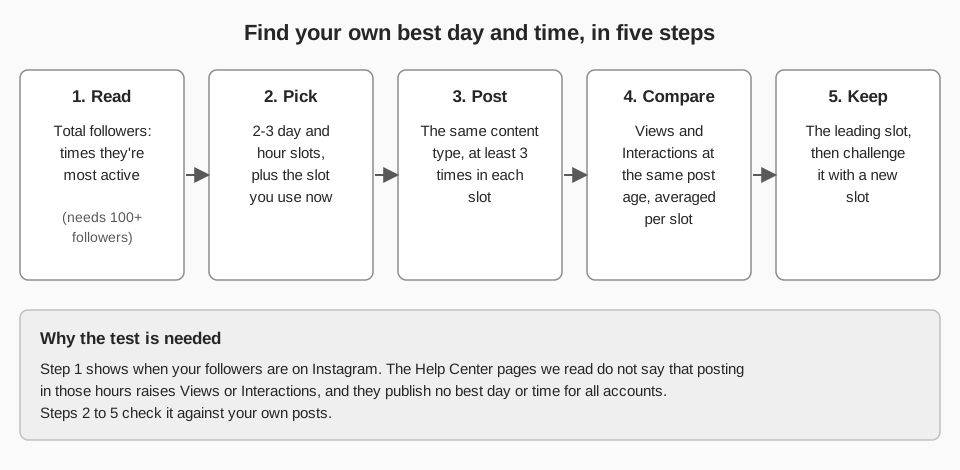
Post similar content in a few fixed day-and-hour slots, repeat each slot several times, and compare the same numbers for every post. Treat the active-times insight as a way to choose which slots to try, not as the answer.
- Choose two or three slots. Take your followers' most active times, then add the slot you use today as a baseline. A slot is a weekday plus an hour, such as Tuesday at 9:00.
- Keep the content comparable. Use one content type per test. Instagram lists different metrics for posts (Views, Interactions, Profile activity) and reels (Views, Watch time, Viewers, Average watch time, Follows), so a Reel and a photo post do not belong in the same comparison.
- Post at least three times per slot. One post proves little, and the example below shows why. With three slots, that is nine posts, or three weeks if you post once per slot each week.
- Read each post at the same age. For a post, tap it on your profile, then tap View Insights. For a Reel, open the Reels tab on your profile, pick the reel, then tap View insights. Instagram says post and reel insights stay available for up to two years, so a fixed check such as seven days after posting is practical.
- Average each slot. Compare average Views and average Interactions per slot.
- Keep the leader and challenge it. Repeat with one new slot against the current winner.
Why one post is not a result
Here is a worked example with invented numbers, not data from Instagram. Slot A's three posts get 40, 55 and 31 interactions, an average of 42 ((40 + 55 + 31) / 3). Slot B's get 70, 25 and 28, an average of 41 ((70 + 25 + 28) / 3).
Slot B holds the single best post, yet its average is one interaction below Slot A's. A gap that small across three posts is a tie, so you keep testing.
How does TrackMedia show your best times?
TrackMedia's Analytics page has a Best times tab that answers the same question from your own posting history. It shows a grid of weekday by hour, titled "When your posts land best", with average engagement for each slot. The grid uses your workspace's time zone, and you can pick a 7, 30 or 90 day preset or a custom range (30 days is the default).
- Only slots with enough posts are ranked. The "Your strongest slots" list holds up to five slots that have at least three posts behind them. Slots with fewer are shown in grey and are not ranked, so one good Tuesday does not become advice.
- It uses the real publish time. A post is counted at the hour it actually went out, not the hour it was scheduled for. Posts imported from your account, which were not published through TrackMedia, are included alongside the ones that were.
- Instagram's rate is TrackMedia's own calculation. For Instagram, TrackMedia divides a post's total interactions by its reach (likes plus comments if total interactions is missing) and caps it at 100 percent. That is not an Instagram metric, so it will not match the Views and Interactions on Instagram's own screens.
- Scheduling shortcuts. When you schedule in the composer, up to two "Best" chips can appear, built from the last 90 days of posts and only from slots with enough posts.
This pairs with the test above. Schedule your candidate slots with TrackMedia, which holds the schedule itself (see how to see scheduled posts on Instagram), then read the Best times tab once each slot has three posts. For how Instagram's own metrics are defined, see what the insights on Instagram mean.
What the best-times view cannot do
- It does not read Instagram's followers-active-times insight. TrackMedia reads followers, following, post count, reach and views for the account, so the two views are independent: Instagram's shows when followers are on the app, and TrackMedia's shows how your posts did.
- A slot needs three posts in the same weekday and hour, so ranked slots appear only if you post at consistent times, which the test above does on purpose.
- The grid follows the network and account filters in Analytics, but the composer's "Best" chips are not filtered to Instagram, so treat them as a hint.
- A slot's rate is averaged over only the posts that reported one, and a slot where none did counts as zero for ranking, so read the post counts and rates before trusting the order.
TrackMedia publishes images and carousels to Instagram. It does not publish Stories, and the web composer has no Reel option, so test Stories and Reels in the Instagram app. For how scheduled publishing works and what Instagram allows, see how to automate Instagram posts.
What to do next
If you want your candidate slots scheduled and the results tracked in one place, you can start free with TrackMedia.
How we checked this
We opened each Instagram page below in a browser on October 6, 2026 and copied menu names and limits from it. Two pages are device-gated, so we read both the computer and iPhone app views. We did not test any of this on a live Instagram account, and Instagram changes its menus, so check the live page if a label looks different.
- About Instagram insights (Instagram Help Center): "Times they're most active on Instagram" under Total followers, 100-follower minimum, 90-day window.
- View account and content insights on Instagram (Instagram Help Center): dashboard steps, 30-day first screen, date ranges, public-account requirement.
- About Instagram dashboards (Instagram Help Center): Professional dashboard, Your dashboard, and the Settings and activity route.
- Create and manage posts in Meta Business Suite on desktop (Meta Business Help Centre): Active times, based on the past seven days.
- View insights on your Instagram posts (Instagram Help Center): post metrics, View Insights path, two-year availability.
- View insights on your Instagram reels (Instagram Help Center): reel metrics, View insights path, two-year availability.
What we could not verify: the exact path, label, layout and time zone of the in-app active-times chart, and any Instagram statement that posting in those hours raises Views or Interactions, so we make no such claim. A Meta Business Help Centre audience-insights page we tried returned a page-not-found error, so we did not use it. TrackMedia's own behavior comes from its analytics, composer and Instagram connector code, read the same day.