You can post up to 20 photos and videos in a single Instagram post. Instagram's Help Center calls it a carousel, and says you can share up to 20 photos and videos as one post to your feed.
This guide uses Instagram's Help Center articles on multi-photo posts and photo posts, read on October 22, 2026. It covers the limit, the steps, how cropping and order work, what you can change after you share, and how many items TrackMedia can publish in one carousel.
How many photos can you post on Instagram at once?
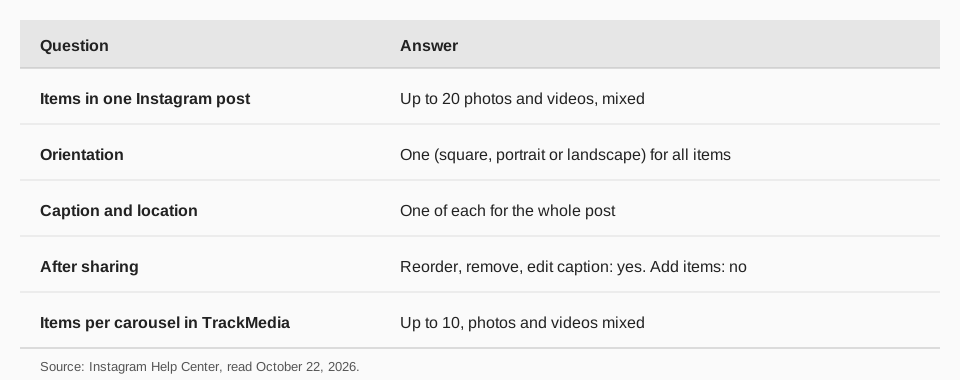
Up to 20, mixing photos and videos if you like. Instagram's article "Share a post with multiple photos or videos on Instagram" opens with that figure. You will still find 10 quoted on older pages, because Instagram's earlier announcement of the feature was titled "Share Up to 10 Photos and Videos in One Post". The current Help Center page says 20.
A single photo is one item, and a carousel is one post with several. Photos and videos in the carousel can sit side by side. The items share one caption and one location, and people can like and comment on the post as a whole, not on each item.
How to post multiple photos on Instagram
Instagram's Help Center gives the steps for a computer. They are the ones to follow on instagram.com:
- Click Create on the left.
- Click Post, then click Select from computer to choose a photo or video.
- Click the multiple-select button, then select up to 20 photos and videos from your computer.
- Adjust the crop. Click and hold an item, then drag it to change how it fits the frame. Click Next in the top right.
- Reorder by clicking and holding one item and dragging it to another spot. To remove an item, click the button next to it. Click Next.
- Apply a filter to every item, or click one item to edit it alone.
- Add one caption and one location for the whole post. To tag someone, click the photo you want to tag them in.
- Click Share.
The page gives these steps for a computer. It does not print separate iPhone or Android steps in the version we read, and the app's selection button may be labeled differently. In the app the flow is the same idea: tap Create, choose several items, and arrange them before you share.
In your feed, people see the first item with a row of dots below it, and swipe for the rest. On your profile, the post shows the first item with a carousel mark in the top right.
One orientation, and the order you choose
Instagram warns that the orientation you pick (square, portrait or landscape) affects all of the photos or videos in your post. You cannot choose a different orientation for each one. So plan the set to work together, or crop the odd one out before you upload.
The first item is the cover of the carousel, so put the one you most want people to see there. Order matters in another way too: Instagram's page says videos in carousels are not considered reels and will not show up in the Reels tab or have reels features.
A post with several videos may take longer to upload. Instagram suggests a reliable network.
Can you edit an Instagram carousel after posting?
Partly. Instagram's page says that after you have shared a post with multiple photos and videos you can reorder the content, remove photos or videos, edit your captions, and edit the location and the accounts you tagged.
To do it, select the three-dot menu on the right side of the carousel, select Edit, then long press to reorder, and select Done to save. What you cannot do is add new photos or videos after sharing. If you forgot one, you have to delete the post and share it again.
How many photos should you put in a carousel?
Instagram sets the maximum, not the best number, and none of its pages we read recommend a count. Let the story decide. A product with three angles needs three photos. A how-to with seven steps needs seven. Padding a carousel to reach 20 only gives people more chances to stop swiping.
Some habits keep a carousel easy to follow:
- Lead with the strongest item, since it is what people see in the feed.
- Crop everything to one shape before you upload, because one orientation applies to all items.
- Keep the order logical, and remember you can still reorder after sharing.
- Add alternative text where Instagram offers it, so the images work for people who use screen readers.
What file types can you use?
For a single photo on a computer, Instagram's "Post a photo on Instagram" page lists the supported formats as jpg, png and heic/heif. You can drag and drop a photo file. The page also lists steps to write alternative text under Accessibility, which is worth doing on every image.
Instagram's pages we read do not publish a file-size limit for photos in a carousel, so we give none. If an upload fails, try a smaller file or a different format.
How many photos can you post with TrackMedia?
TrackMedia publishes Instagram carousels of up to 10 photos and videos in one post, and lets you mix both. You build the carousel in the composer, which fits a version of your post to Instagram, and TrackMedia runs preflight checks before it goes out. You can also add a first comment and alt text, tag mentions in the caption, and schedule the post on a calendar or in a queue.
For Instagram, TrackMedia accepts JPG and PNG images and videos in MP4 or MOV. If you want an 11-to-20-item carousel, create that one in the Instagram app, where the limit is 20. For everything else, scheduling from one place saves the time of opening each app.
After the post is live, TrackMedia tracks the links you put in the post with UTM tags, so you see clicks, visitors and referrers per post. A link in an Instagram caption is plain text, so the link in your bio is the usual route. Our guide to where to find the link in bio on Instagram shows where it sits. To plan carousels in advance, see how to build an Instagram content calendar, and how to post on Instagram from a computer for the desktop route. Start free with TrackMedia: 15 posts a month, one account per network, no card.
What about Reels and Stories?
This post is about feed posts. Instagram's multi-photo article covers only the feed carousel, and we found no number on the Help Center pages we read for how many items a Story can hold at once. Instagram's help page on combining photos on a Story is listed for the iPhone and Android apps, not for computers.
For Reels, see our guide to how long an Instagram Reel can be.
If you want a deeper look at where carousels fit among formats, our comparison of Reel vs Story vs post covers when a carousel is the better choice. Carousels suit steps, comparisons and sets, because people can swipe at their own pace and come back to a single item.
Questions people also ask
How many pics can you post on IG?
Up to 20 photos and videos in one post, according to Instagram's Help Center. "IG" and "Instagram" are the same app.
Can you post more than 20 photos on Instagram?
Not in one post. Split the set into two posts, and put a note in the caption of the first.
Can you mix photos and videos in one post?
Yes. Instagram's page says you can share up to 20 photos and videos as a single post.
Can you add photos to a carousel after posting?
No. You can reorder, remove, and edit captions, location and tags, but not add new items.
Why do some pages say 10 photos?
Instagram's earlier announcement of carousels was titled "Share Up to 10 Photos and Videos in One Post", and many pages kept that number. Instagram's current Help Center article says 20.
How we checked this
We opened each page below in a browser on October 22, 2026 and copied the numbers and labels. We did not test uploading 20 items on a live account.
- Share a post with multiple photos or videos on Instagram (Instagram Help Center): the 20-item limit, steps, orientation, editing after sharing, and the note on videos in carousels.
- Post a photo on Instagram (Instagram Help Center): supported file formats and the alternative text step.
- New: Share Up to 10 Photos and Videos in One Post (Instagram Blog): only its title is used, for the earlier 10-item limit.
- Combine multiple photos into one on your Instagram story (Instagram Help Center): the device availability for Stories.