To delete a Facebook business Page, switch into the Page, open Settings & privacy and Settings, click Access and control, and choose Delete Page. Facebook deactivates the Page immediately, but it is not permanently deleted until 14 days have passed.
This guide follows Facebook's Help pages on deleting or cancelling deletion of a Page, deactivating or reactivating a Page and unpublishing and republishing a Page, read on October 22, 2026. It also shows what to do first, so a deleted Page does not leave broken tools behind.
Sources: deleting or cancelling deletion of a Page · deactivating or reactivating a Page · unpublishing and republishing a Page
Should you unpublish, deactivate or delete a Page?
Pick the mildest option that does the job, because only deletion ends with the Page gone. Facebook lists three, and neither unpublishing nor deactivating deletes anything.
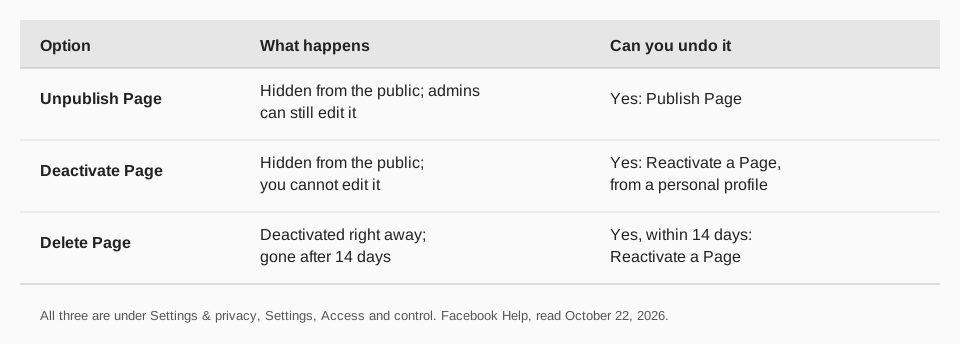
- Unpublish hides the Page from the public but you can still edit it. Edits go live only after you publish again. Facebook says an unpublished Page isn't visible or searchable to people without access, can't comment or message as the Page, and has its ad campaigns paused.
- Deactivate hides the Page and followers cannot see it until you reactivate it. You can't edit a deactivated Page.
- Delete starts a 14-day countdown to permanent removal.
How do you delete a Facebook business Page?
You need Facebook access with full control of the Page. If you can't see the delete option, check your access level. Then follow the steps in Facebook's Help Center:
- Switch into the Page. Click your profile photo in the top right, click See all profiles, then select the Page.
- Click your Page photo in the top right.
- Click Settings & privacy, then Settings.
- Click Access and control in the left menu.
- Select Delete Page, click Continue and follow the prompts. You may need to enter your password again.
Facebook says it deactivates the Page immediately and deletes it permanently after 14 days. Facebook gives one set of steps and does not list a separate mobile route, so use the same menu names in the app.
How do you cancel deleting a Facebook Page?
You have 14 days, and you must do it from your personal profile, not from the Page's business settings:
- From your main profile, click your profile photo in the top right.
- Select Settings and privacy, then Settings.
- Under Your activity, click Reactivate a Page.
- Find the Page and click Reactivate.
Facebook says this works only for Pages that are deactivated but not yet permanently deleted. After the 14 days are up, the Page cannot be restored this way.
How do you deactivate or unpublish a Page instead?
The menu is the same: Settings & privacy, Settings, then Access and control. Choose Deactivate Page or Unpublish Page, click Continue and follow the prompts (Unpublish asks you to click Confirm).
To bring it back, choose Publish Page in the same place for an unpublished Page, or use Reactivate a Page from your personal profile for a deactivated one. A parent Page affects its child Pages, such as store locations: deactivating or unpublishing the parent does the same to the children, and a child that was handled separately must be restored separately.
What should you do before deleting a Page?
- Check the tools connected to it. Schedulers, ad accounts and apps that post to the Page will fail after it is gone, so list them first.
- Pause or move your scheduled posts. Anything queued for the Page in another tool has nowhere to go.
- Check who has full control. Facebook deactivates a Page automatically if no one has full control of it, and schedules it for deletion.
- Pick unpublish if you only need a break. It keeps the Page editable.
Facebook also says Pages that only you control are deleted along with your personal account. If you want to keep a Page, give someone else full control before that happens.
How to disconnect your Facebook Page in TrackMedia first
TrackMedia publishes to a Facebook Page, so disconnect or clear it before the Page goes away. That keeps the queue from trying to post to a Page that no longer exists, and keeps your calendar honest.
- Move or delete queued posts. Open your calendar or Posts list, filter by the Facebook Page, and reschedule or remove what is still waiting. Posts that already published stay on Facebook.
- Move your content elsewhere. TrackMedia posts to 21 networks from one composer, so you can send the same content to your other networks while the Page is gone.
- Disconnect the account. Disconnecting inside TrackMedia deletes its stored access. For a full cleanup, also remove the app in Facebook's own settings.
If you create a new Page later, the free plan allows one account per network with no card, so you can connect it again. Our guides to seeing and editing scheduled Facebook posts and managing multiple social media accounts help with the move, and you can start free with TrackMedia.
If you only want to tidy up rather than delete, see how to edit a post on Facebook instead.
Questions people also ask
How long does it take to delete a Facebook business Page?
Facebook deactivates it immediately and permanently deletes it after 14 days.
Can I recover a deleted Page?
Within the 14 days, yes: use Reactivate a Page from your personal profile. After that, Facebook's page describes no way to restore it.
Why can't I see the Delete Page option?
You probably lack full control of the Page. Facebook says deleting needs Facebook access with full control.
Does deleting my personal profile delete my Page?
Pages that only you control are deleted with your account. Give someone else full control first if you want to keep a Page.
How we checked this
We opened each page below on October 22, 2026 and copied the labels. We did not delete a Page to test the steps, and Facebook changes its menus. TrackMedia's disconnect behavior comes from its own code and its data deletion page.
- Delete or cancel deletion of your Facebook Page (Facebook Help): delete and cancel steps, the 14-day period, access.
- Deactivate or reactivate your Facebook Page (Facebook Help): deactivate and reactivate steps, parent and child Pages.
- Unpublish and republish a Page (Facebook Help): unpublish steps and what changes while unpublished.