To put a link in your TikTok bio, open the TikTok app, tap Profile, tap Edit profile, then tap Add next to Links. TikTok's Help Center says you can add a website link if you have at least 1,000 followers, or if you have a Verified Business Account.
This guide uses TikTok's page Adding a website link to your profile, read on October 6, 2026. It covers who qualifies, the steps, what people see when they tap, and how to count the clicks.
Who can add a link to their TikTok profile?
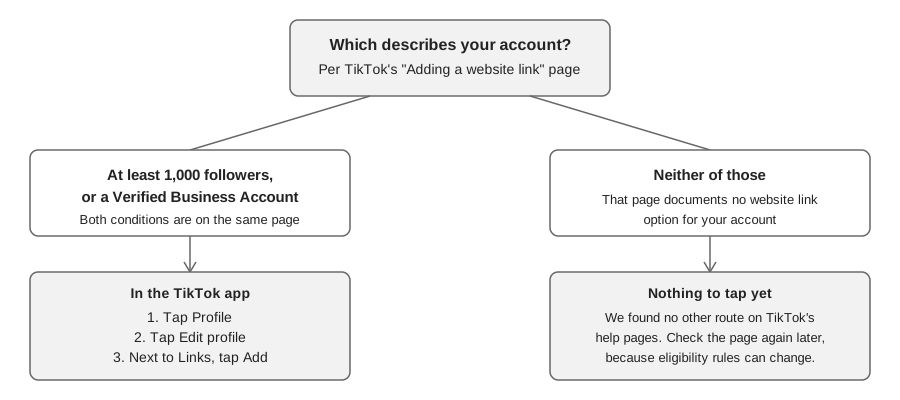
TikTok's page gives two ways to qualify: at least 1,000 followers, or a Verified Business Account. Meeting either one is enough, according to the page's wording. If you have neither, the page documents no other way to add a website link.
Two things the page does not say. It does not explain how an account becomes a "Verified Business Account", and it does not say whether the link option disappears if your follower count later drops below 1,000. We did not find a second TikTok help page with a different threshold, so there was no disagreement to report. We checked only the pages listed at the end, and TikTok can change this rule, so read the live page if the option is missing for you.
How to add a link to your TikTok bio, step by step
TikTok's page lists these steps for the app:
- Open your profile. In the TikTok app, tap Profile at the bottom.
- Edit it. Tap Edit profile.
- Add the link. Next to Links, tap Add.
- Finish the prompts. TikTok says to "follow the steps to link your website". The page does not describe what those prompts ask for, so go by what the app shows.
The page describes only the app steps, so we are not giving steps for a computer or mobile web.
The same TikTok page says you can also add a Lemon8 account to your profile "where available". And it warns that TikTok no longer supports links that open or log you into other social media apps. You can still link to those platforms' websites.
Is the link field the same as your bio text?
Not according to TikTok's steps. The Links row on the Edit profile screen is separate from your bio. TikTok's page on changing your bio gives a limit of 80 characters for the bio text, and that page does not mention links at all. It describes the web steps (profile picture, View Profile, Edit profile, Bio, Save).
The practical consequence: put the address in Links, and use the bio line to tell people why to tap it. We found no TikTok page saying that a URL typed into the bio text becomes tappable, so do not rely on it.
What happens when someone taps your TikTok link?
According to TikTok, when someone taps a link on a profile, its in-app browser opens the page. TikTok adds that it limits how people can browse chains of external links inside that browser, for all accounts, to protect against scams, phishing and malware. As a result, a visitor may see a message prompting them to open the page in their device's web browser.
TikTok also recommends that creators "add direct links so people can access the intended site in just a few steps". TikTok does not define "external link chains", and the page does not say whether a short link that redirects counts as one or triggers the browser prompt. A direct link is what TikTok recommends. If you use a short link anyway, open it from your own profile on a phone and see what appears.
If you see a suspicious link on someone else's profile, TikTok's page says to tap the link, tap More options (the ... button) at the top, then tap Report.
How to track clicks on your TikTok bio link
The profile link field is a plain address, so any click count has to come from the link itself. TikTok's Help Center page for this feature does not describe click analytics for the Links field, so we are not claiming that TikTok shows them. If you want numbers, use a tracked link, or read the destination site's own analytics.
One way is a short link whose clicks are counted for you. In TrackMedia, open the Links page, choose Shorten a link, paste the full address and copy the short link into TikTok's Links field. A link made this way gets no UTM tags added, and its destination is exactly the URL you pasted, so write any UTM tags into the address first. Our guide to tracking clicks on an Instagram link shows the same short-link-plus-UTM approach for Instagram, and a short link made on the Links page works the same way for a TikTok profile link.
The Analytics tab on the Links page then shows clicks, visitors, clicks per day, top links, countries, referrers, devices and browsers over 7, 30 or 90 days. Bots are excluded from the daily chart and the breakdowns. For a different kind of number, our guide to checking analytics on TikTok covers what TikTok reports about your videos.
The trade is plain: a short link gives you click counts, and a direct link is what TikTok recommends. Decide which matters more for this link.
Do you need a link-in-bio page for TikTok?
Only if you have several destinations. The TikTok page describes a single website link field and says you can also add a Lemon8 account. It does not say you can list many websites, so if you need several destinations, a page of buttons is one option. Our guide to link in bio tools compares the options and what to check before you pick one.
TrackMedia is not a link-in-bio page builder. It helps with the tracked short link that goes in the field, and with tracked links inside the posts you publish. TikTok captions are left as written, because captions are not clickable there. If you want TrackMedia's help counting clicks, you can start free with TrackMedia.
Why can't I see the Links option on my TikTok profile?
The most likely reason, based on TikTok's page, is eligibility: fewer than 1,000 followers and no Verified Business Account. TikTok does not list other causes, so we cannot confirm any other explanation, such as app version or region. Check the live page, update the app, and contact TikTok through its Help Center if the option is still missing and you meet the rule.
How we checked this
We opened each page below in a browser on October 6, 2026 and copied the numbers and labels from it. We did not test the steps on a live TikTok account, so button positions may differ in your app version.
- Adding a website link to your profile (TikTok Support): the 1,000-follower and Verified Business Account rule, the app steps, the in-app browser behavior, the direct-link recommendation and the Lemon8 and social-app notes.
- Changing account bio (TikTok Support): the 80-character bio limit.
We could not verify how an account becomes a Verified Business Account, whether the link persists if followers drop below 1,000, how to add the link from a computer, whether TikTok shows click counts for the link, or how a redirecting short link behaves in TikTok's in-app browser. We left those out. TrackMedia's behavior comes from its own product code, read the same day.