Instagram's Help Center does not describe any screen that lists the accounts that reposted your post. It does say that you cannot see who reshared your reel or where they shared it, whether your account is private or public. What you can do is control whether people may repost you at all, and read the engagement counts that Instagram does show.
This guide uses Instagram's Help Center pages on reposting, resharing to stories and post insights, plus Meta's developer reference for Instagram media insights, all read on October 22, 2026. It also answers what a repost is, what reposting does, and what "regram" means.
Can you see who reposted your Instagram post?
Not from anything Instagram documents. Its page on reposting a reel or a post covers how you repost, find and delete your own reposts, allow or block reposts of your content, and report a repost. It describes no list of the people who reposted yours.
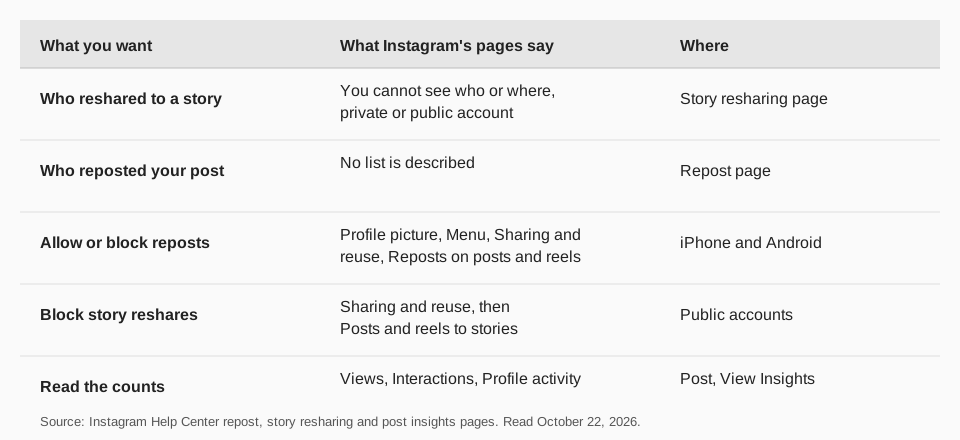
The closest official statement is on Instagram's page about sharing someone's post from Feed to your story. It says: "You won't be able to see who has reshared your reel or where they have shared it to, regardless of whether you have a private or public account." That sentence is about resharing to stories, and we found no equivalent line for the Repost feature. We do not claim either way for reposts.
Sources: reposting a reel or a post · sharing someone's post from Feed to your story
What is a repost on Instagram?
A repost is Instagram's built-in way to share someone else's public reel or post on your own profile. According to Instagram, when you repost, your followers may see that you reposted in their feeds, and reposts appear in a dedicated repost tab on your profile. Tapping Repost on a public reel or post, optionally adding a note, and tapping Save does it.
It works only when the original creator allows it. The page says you can only repost if the creator allows reposts of their content, only content posted by the original creator can be reposted, and you cannot repost a repost. The feature may not be available to everyone, and the page marks it as not available on computers. For the full steps, see our guide to how to repost a reel on Instagram.
What does reposting do?
For the person who reposts, it puts the content on their profile and may show it to their followers. For the original creator, Instagram's pages describe no notification or credit screen, which is why the question "who reposted me" has no documented answer. Two facts from the page do apply:
- Other Instagram users can comment on a repost, and those comments appear as direct messages to the person who reposted.
- Your followers "may be able to see your repost if they come across that piece of content", so reach depends on who encounters it, not a guarantee.
Instagram also warns, on the story resharing page, that when you allow others to remix or reshare your content, the remixed or reshared content may be indexed and displayed in search engine results.
How to find out how well your post was shared
Instagram does show counts, even when it hides names. Its page on viewing insights on your posts lists three groups: Views (the number of times your content was displayed), Interactions (actions such as likes, comments, saves and shares) and Profile activity (what people do after visiting your profile). To open them, go to your profile, tap the post, then tap View Insights. You need a public account to view insights, and insights for posts are available for up to two years.
That page names shares as part of Interactions, and does not name reposts. Meta's developer reference for Instagram media insights does list a reposts metric, defined as the number of reposts on the media minus the number of deleted reposts, and a separate shares metric. It lists reposts for feed posts, reels and stories. That is a count, not a list of accounts.
For a longer view of how your posts perform, read what Instagram Insights numbers mean and Instagram story analytics.
Sources: viewing insights on your posts · Instagram media insights
How to control who can repost or reshare your content
If you do not want to be reposted, turn it off. Instagram's repost page gives these steps for the iPhone and Android apps:
- Open the Instagram app and tap your profile picture in the bottom right.
- Tap Menu in the top right.
- Tap Sharing and reuse below How others can interact with you.
- Tap the toggle next to Reposts on posts and reels to allow or block reposts of your content.
Resharing to stories has its own switch on the same screen. The story resharing page says that on iPhone and Android you tap the toggle next to Posts and reels to stories, and that if you have a public account you can turn off others' ability to reshare your posts. Sharing a post to a story is only possible if the account is public and has allowed resharing.
If someone's repost bothers you, Instagram's page says to long-press the profile picture of the repost at the bottom left of the reel or post, tap Report, and follow the on-screen instructions.
Why might your content not show a Repost button for others?
If you expected reposts and see none, check the conditions Instagram sets. A reel or post can only be reposted when it is public, when the creator allows reposts of their content, and when it is the original creator's own post rather than someone else's repost. Your own setting under Sharing and reuse decides whether others may repost you, so confirm Reposts on posts and reels is on.
Instagram's page also says the feature may not be available to everyone, and that it is not available on computers. A creator whose audience mostly uses the website therefore sees fewer reposts, and a missing repost does not always mean low interest. To judge interest, look at shares and saves in insights rather than reposts alone.
If your account is private, other people cannot reshare it to stories either, because Instagram says sharing a Feed post to a story needs a public account that has allowed resharing. That is a trade-off to weigh against reach.
What does "regram" mean, and how do you regram a post?
"Regram" is informal slang for sharing someone else's Instagram post, usually with credit. It is not an Instagram feature name. The official ways to share another person's content are the ones above: Repost, and sharing a Feed post to your story. Both depend on the original creator's settings.
Using another person's photo or video any other way, such as downloading it and posting it as your own, is outside what Instagram's pages describe, and you would need the creator's permission. Credit them by their handle in the caption and ask first.
How to track the reach of your posts with TrackMedia
TrackMedia shows what Instagram will tell you, in one place and over time, and adds what Instagram cannot: where the clicks go.
- Views, reach, saves and shares per post. TrackMedia reads these for each Instagram post and keeps every reading, so you can see how a post grew after it went out. This includes posts you did not publish with TrackMedia.
- Clicks from a post. A tracked link with UTM tags in your caption or bio shows clicks, visitors and referrers per post. See how to see who clicked your Instagram link.
- Credit people properly. When you collaborate or feature someone with permission, add their handle as a mention in the caption, so they are tagged in your post.
- One composer, 21 networks. Plan Instagram posts, Reels and carousels with the rest of your channels. See how to plan an Instagram content calendar.
To start, try TrackMedia free; the Free plan covers 15 posts a month with no card.
Questions people also ask
How do I see who reposted my post on Instagram?
Instagram's Help Center describes no list of who reposted your post. It says you cannot see who reshared your reel to a story. You can see counts in post insights.
What is Repost on Instagram?
A feature that shares someone else's public reel or post to a dedicated tab on your profile, and possibly to your followers' feeds, if the creator allows reposts.
What does reposting do on Instagram?
It puts the content on your profile and may show it to your followers. Comments on your repost reach you as direct messages, according to Instagram.
How do you regram a post?
Use Instagram's Repost button on a public reel or post, or share a Feed post to your story, if the creator allows it. Credit the creator and ask first for anything else.
How we checked this
We opened each page below in a browser on October 22, 2026. For the Instagram Help Center pages we read the iPhone and Android versions where they differ.
- Repost a reel or a post on Instagram (Instagram Help Center): steps, conditions, where reposts appear, settings and reporting.
- Share someone's post from feed to your Instagram story (Instagram Help Center): the note on not seeing who reshared your reel, and the story resharing setting.
- View insights on your Instagram posts (Instagram Help Center): Views, Interactions and Profile activity.
- Instagram Media Insights (Meta for Developers): the reposts and shares metrics.
TrackMedia's behavior comes from reading its Instagram connector the same day. Instagram changes its app often, so check the live page if a label differs.