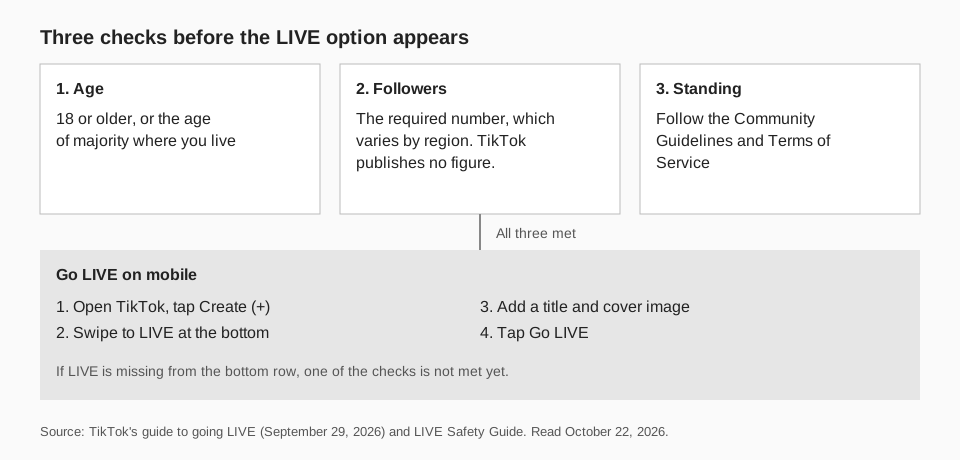
TikTok does not publish how many followers you need to go LIVE. Its pages say your account must have "the required number of followers, which may vary by region", and that you must be at least 18 years old (or the age of majority where you live). The number depends on your country, so the only reliable check is whether the LIVE option appears in your own app.
This guide uses TikTok's LIVE Studio Help Center, its LIVE Safety Guide and its LIVE Creator Networks guide dated September 29, 2026, all read on October 22, 2026. It covers the requirements TikTok does state, the steps to go LIVE on mobile and desktop, why the option may be missing, and how to watch your follower count approach the line.
How many followers do you need to go live on TikTok?
There is no single figure on TikTok's own pages. The LIVE Safety Guide says that to go LIVE you must be at least 18 years old, and your account must have a certain number of followers, which may vary by market. TikTok's guide to going LIVE (dated September 29, 2026) repeats that you need the required number of followers, which may vary by region.
You will find specific numbers on other websites. We do not repeat them, because TikTok states none, and the pages we read say the requirement differs by country. If a site gives you a firm number, treat it as a guess and check your app.
Sources: LIVE Safety Guide · guide to going LIVE
What are the requirements to go live on TikTok?
TikTok's guide lists three requirements to go LIVE. Creators must:
- Be at least 18 years old, or meet the age of majority in the relevant country or region.
- Have the required number of followers, which may vary by region.
- Follow TikTok's Community Guidelines and Terms of Service.
The same page adds that creators must meet specific criteria, including varying regional age thresholds, to monetize by LIVE. So going LIVE and earning from LIVE have separate requirements. The LIVE Safety Guide says that when you first start, you may not have access to all the features LIVE offers, and that you can gain access to the full LIVE experience over time as long as you follow TikTok's safety policies.
How to go live on TikTok on your phone
When you meet the requirements, TikTok's guide gives these steps for the mobile app:
- Open the TikTok app and tap the Create (+) button.
- Swipe through the options at the bottom and select LIVE.
- Add a title and a cover image, and set the other options your content plan needs.
- Tap Go LIVE to start.
Before you start, the guide says you can adjust camera settings, effects, comment controls, moderator permissions and audience restrictions. If the LIVE option does not appear in the row at the bottom, you do not have access yet. TikTok's pages do not say what the app shows in that case, so go by what your screen offers.
How to go live on TikTok on a computer
TikTok's guide describes three desktop routes and notes that their availability may vary by account and region.
TikTok LIVE Studio
Download and install LIVE Studio, open it and log in with a valid TikTok account, then set up your camera, microphone and screen capture. Add a title, check the preview and start the LIVE from the app. TikTok's page on applying for LIVE access (updated February 11, 2025) says you need LIVE access to use LIVE Studio, and that you can check your status in the top right corner of the app and click Your LIVE access to apply.
OBS
Create or select a scene, add your video and audio sources, enter the Server URL and Stream Key that TikTok provides in OBS's streaming settings, check the preview and click Start Streaming.
TikTok on the web
Open TikTok in a desktop browser, log in, select the available Go LIVE or LIVE option, add a title and cover, and select Go LIVE.
Sources: applying for LIVE access
How to get LIVE access for LIVE Studio
LIVE Studio has its own access rule. TikTok's page says that if you are an active LIVE creator on TikTok, you can get access instantly when you meet these conditions:
- Your TikTok account was created a certain number of days ago.
- You have gone LIVE for a certain amount of time recently.
- You have a certain number of followers.
- Your LIVE access has not been suspended recently, and there is no current suspension or revocation.
Again TikTok gives no numbers; it says the requirements vary by country or region and are subject to change without notice. Once you click Get access, the page says access is renewed automatically for longer periods when there has been no suspension or revocation recently.
If you stream on other platforms and are not an active TikTok LIVE creator, the page says clicking Your LIVE access takes you to an application form where you give information about your channel elsewhere. It says review might take days and that you get a notice in the TikTok app when approved.
Why can't I go live on TikTok?
Work through the documented causes in order:
- Age. You must be 18 or older, or at the age of majority where you live.
- Followers. Your account may be below the required number for your region. TikTok does not show the number.
- Account standing. You must follow the Community Guidelines and Terms of Service, and for LIVE Studio your access must not be suspended or revoked.
- Region or account. TikTok says desktop options can vary by account and region.
If none of those explains it, TikTok's Help Center has an "Issues with TikTok LIVE" section, which we did not find detail for in the pages we read. Our TikTok LIVE analytics guide covers what to review after you do go live.
How to track your progress toward the follower requirement
Because the number is hidden, track the one you control: your own follower count and what moves it. Your TikTok profile shows your current followers. What the profile does not show is how fast you are gaining them or which videos caused it.
Look at per-video results rather than the total. TikTok's own recommendation system page says its For You feed recommends videos to people based on their interactions, so strong videos can reach people who do not follow you yet. Our guide on what FYP means on TikTok explains how that feed works, and how to check TikTok analytics shows where TikTok reports views. Posting regularly helps you learn what works, and a TikTok content calendar keeps that from being random.
How to prepare for going live with TrackMedia
TrackMedia does not stream for you. LIVE starts inside TikTok. What it does is handle everything around it, so the run-up to your first LIVE is organized.
- Schedule the videos that grow your audience. Plan TikTok posts in a calendar and queue, and publish to TikTok and 20 other networks from one composer.
- See your follower count daily. TrackMedia reads each connected TikTok account's follower count once a day and keeps every reading, so you can see your growth curve and notice the day LIVE appears in your app.
- Learn which videos bring followers. Views, likes, comments and shares per video sit next to the follower trend.
- Announce your LIVE everywhere. Schedule a post on your other networks, with a tracked link, so you know how many people came from each.
When you are ready, start free with TrackMedia; the Free plan has no card and covers 15 posts a month.
Questions people also ask
How many followers do you need to go live on TikTok?
TikTok does not publish the number. It says the required count may vary by region, and that you must be 18 or older.
Can you go live on TikTok without a certain number of followers?
TikTok's pages say you need the required number of followers for your region. They describe no way around it, so check whether the LIVE option appears in your app.
How old do you have to be to go live on TikTok?
At least 18, or the age of majority in your country or region, according to TikTok's guide and LIVE Safety Guide.
How do I get LIVE access on TikTok?
For LIVE Studio, open the app, check your status in the top right corner and click Your LIVE access. Active TikTok LIVE creators can get access instantly when they meet the conditions; others apply with a form.
How we checked this
We opened each page below in a browser on October 22, 2026 and read the full text.
- How to Go LIVE on TikTok: A Step-by-Step Guide (TikTok LIVE Creator Networks, September 29, 2026): requirements, mobile and desktop steps.
- LIVE Safety Guide (TikTok Safety Center): the age and follower requirement and the note on features.
- Apply for LIVE access (TikTok LIVE Studio Help Center, updated February 11, 2025): LIVE Studio access conditions.
TikTok's regional rules change, so confirm in your app. TrackMedia's behavior comes from reading its TikTok connector the same day.