Instagram Reels vs TikTok comes down to a handful of documented differences: Instagram's Help Center says a Reel can be up to 20 minutes long in the app, while TikTok's Help Center says videos you upload in the app can be up to 60 minutes and videos you record can be up to 10. Upload specs, analytics, scheduling and API publishing also differ, and this guide lines them up.
Every number below comes from an Instagram, Meta or TikTok page we opened on October 6, 2026, and each is attributed. We compare features only, and we say nothing about audience size or reach, because the official pages we read do not support such claims.
How long can a Reel or a TikTok video be?
Each platform publishes more than one limit, depending on whether you record, upload, use a web tool or publish through an API.
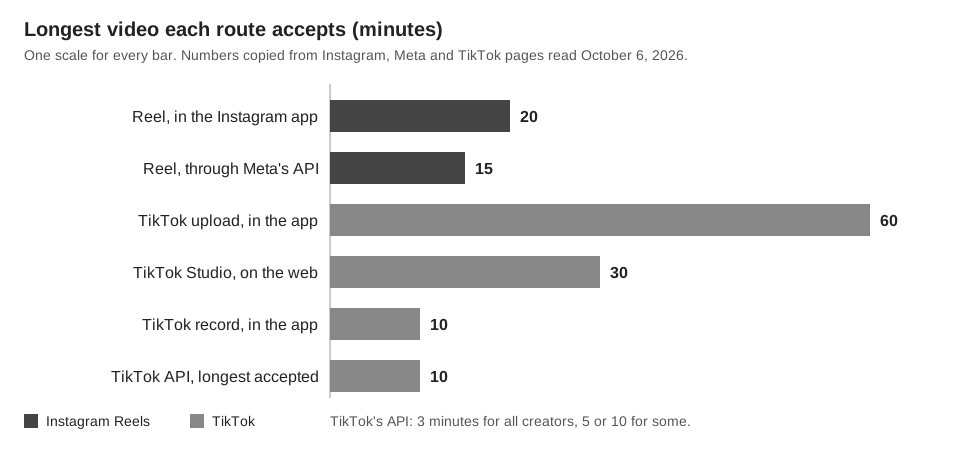
Instagram's page Record a reel on Instagram says you can record and edit videos up to 20 minutes with Reels, and adds that reels over 3 minutes will not be recommended to new audiences. Meta's IG User Media reference says a Reel published through the API can be 15 minutes at most and 3 seconds at least. Our guide on how long an Instagram Reel can be covers that gap in detail.
TikTok's Camera tools page says videos you record in TikTok can be up to 10 minutes long, and videos you upload can be up to 60 minutes long. Its Tools for creators page lists up to 30 minutes for uploads in TikTok Studio on the web. The Media Transfer Guide says all creators can post 3-minute videos through the API and some can post 5 or 10, and that the longest video a developer can send is 10 minutes.
What are the upload specs in Instagram Reels vs TikTok?
"Not stated" in the table means we found no number on the pages we read.
| Attribute | Instagram Reels | TikTok |
|---|---|---|
| Aspect ratio | App: between 1.91:1 and 9:16. API: between 0.01:1 and 10:1, with 9:16 recommended | Not stated on the pages we read |
| Resolution and frame rate | App: minimum 720 pixels and 30 FPS. API: up to 1920 pixels wide, 23 to 60 FPS | Web: 720x1280 or higher. API: 360 to 4096 pixels on each side, 23 to 60 FPS |
| File size | App: not stated. API: 300MB maximum | Web: less than 10 GB. API: 4GB maximum |
| File formats | API: MOV or MP4, H264 or HEVC video, AAC audio | Web: MP4 or WebM. API: MP4, WebM or MOV; H.264, H.265, VP8 or VP9 |
The Reels app figures come from Instagram's Reel size and aspect ratios page, which does not say whether "720 pixels" means width or height. The API and TikTok web figures come from the sources listed at the end.
What analytics do Reels and TikTok offer?
| Attribute | Instagram Reels | TikTok |
|---|---|---|
| Where to look | Reels tab on your profile, select the reel, then View insights | Profile, Menu, TikTok Studio, Analytics in the app; tiktok.com/tiktokstudio on the web |
| Per-video views | Views, Watch time, Viewers, Average watch time, Follows | Video analytics: Overview, Viewers, Engagement |
| Limits stated | Reels posted on or after May 14, 2021; viewable up to two years; audience demographics need over 100 accounts | Analytics "currently not available to everyone"; data may be delayed, so TikTok suggests waiting a few days |
Sources: Instagram's View insights on your Instagram reels and About Instagram insights, and TikTok's TikTok Studio and How to use TikTok Analytics pages. Do not compare a count across the two without checking definitions: Instagram defines Views as the number of times a reel starts to play or replay, and the TikTok pages we read give no matching definition. See how to check analytics on TikTok.
Can you schedule Reels and TikTok videos?
Yes on both, with different rules. Instagram schedules Reels from the app, and TikTok's Help Center describes scheduling on desktop web.
| Attribute | Instagram Reels | TikTok |
|---|---|---|
| Where you schedule | Instagram app: More options, then Schedule this reel | TikTok Desktop Web: Upload, then the schedule toggle |
| How far ahead | Up to 30 days, up to 25 posts a day | At least 15 minutes and at most 10 days |
| Who can use it | Public accounts | Unclear: the Help Center says only a Business Account "or over with a 10,000 followers or more"; TikTok for Business says a Business Account. Not mobile web |
| After scheduling | Delete, Edit post, Reschedule, Share now | Cannot be edited; can be deleted |
| Not compatible | Product tagging, collaborative posts, sponsored posts, fundraisers | Not stated |
These come from Instagram's scheduled posts and Reels page and TikTok's Help Center page Schedule video. TikTok's own pages disagree on eligibility: the Help Center wording above is ambiguous, while the Video Scheduler post on the TikTok for Business blog says you need a Business Account for desktop scheduling. Both pages are undated, so check your upload screen first. For whether scheduling changes performance, see does scheduling a post on TikTok affect views.
What do the publishing APIs allow?
Meta's Content Publishing guide (updated June 30, 2026) says an unpublished container expires after 24 hours, limits accounts to 100 API-published posts in a 24-hour moving period, and tells apps that let users schedule posts to enforce that limit themselves. We found no publish-time field in it, so a scheduling tool appears to hold the schedule itself. TikTok's Direct Post reference lists no scheduling field either, and says content posted by unaudited clients is restricted to private viewing until the client passes an audit.
What link options do Reels and TikTok have?
Both platforms document links on the profile only. Neither page set we read describes a clickable link field inside a video, or says whether a web address typed in a caption becomes tappable.
- Instagram: Add a website to your Instagram profile (iPhone version) says you can add up to 5 websites (Edit profile, Links, Add external link), visible to anyone on or off Instagram. See where to find the link in bio on Instagram.
- TikTok: Adding a website link to your profile says you need at least 1,000 followers or a Verified Business Account (Edit profile, then Links, then Add). Links open in TikTok's in-app browser, and TikTok no longer supports links that open other social media apps.
How does TrackMedia handle Reels and TikTok?
TrackMedia holds a scheduled post itself and publishes it at the time you chose, so it does not appear in Instagram's own Scheduled content list. The two networks differ in what the web composer can send:
- Instagram: images and carousels of up to 10 items. A Reel can be requested through the API or a per-target override, but the web composer has no Reel option.
- TikTok: the composer offers Post to TikTok or Send to TikTok inbox as a draft. The visibility choices come from TikTok for each account, and TikTok's developer docs say posts from unaudited apps are restricted to private viewing.
- Analytics: TrackMedia shows the numbers each platform supplies (Instagram: views, reach, likes, comments, saves, shares; TikTok: views, likes, comments, shares) and ranks posts published elsewhere alongside its own. Watch time and retention are not among them.
- Links: links in clickable fields become tracked short links, but links in Instagram and TikTok captions are left as written. TrackMedia is not a link-in-bio page builder.
See how analytics works in TrackMedia, or start free with TrackMedia to keep both networks in one queue.
How we checked this
We opened each page below in a browser on October 6, 2026, and copied the numbers and menu names from it. We did not upload test videos, so we have not confirmed what either app does when a file breaks a limit.
- Instagram Help Center: Record a reel on Instagram (20 minutes; the 3-minute note), Reel size & aspect ratios on Instagram, How to create and manage scheduled posts and Reels on Instagram, View insights on your Instagram reels, About Instagram insights and Add a website to your Instagram profile (iPhone version).
- Meta for Developers: IG User Media (updated September 28, 2026) for Reel specifications, and Content Publishing (updated June 30, 2026) for the container flow and limits.
- TikTok Help Center: Camera tools, Tools for creators, TikTok Studio, How to use TikTok Analytics, Schedule video and Adding a website link to your profile.
- TikTok for Business blog (undated): Introducing Video Scheduler.
- TikTok for Developers: Media Transfer Guide and Direct Post.
What we could not verify: which of TikTok's two pages is current on who can schedule from desktop, an Instagram in-app file size limit, a TikTok aspect ratio requirement, whether Instagram's 720-pixel minimum is width or height, a TikTok definition of its views metric, and whether captions make links tappable on either platform. We did not read TikTok's Creator Academy or check any analytics API. Meta's Content Publishing page gives 100 API-published posts per 24 hours in one place and 50 for carousels in another. TrackMedia's own behavior comes from our product and connector code, read the same day.