Instagram analytics tools that connect through Meta's official Instagram API can show only what that API exposes for professional (business or creator) accounts. When you compare Instagram analytics software, the useful questions are which metrics a tool requests, how often it reads them, and how long it keeps them.
This guide compares the Instagram app's own Insights with what Meta documents for apps, using Instagram's Help Center and Meta's developer pages read on October 6, 2026. It names no competing products, because we did not open their pages.
How do Instagram analytics tools get their data?
Meta's Instagram Platform overview (updated September 28, 2026) describes the platform as a collection of APIs for Instagram professional accounts, including business and creator accounts. It lists two configurations. Instagram API with Instagram Login serves professional accounts without a linked Facebook Page, and Instagram API with Facebook Login serves accounts linked to a Facebook Page. The overview marks insights as supported in both.
Before a tool can read anything, the account owner grants permissions when connecting. Meta's Instagram Platform insights page lists instagram_business_basic and instagram_business_manage_insights for the Instagram Login route. For the Facebook Login route it lists instagram_basic, instagram_manage_insights and pages_read_engagement.
The overview also separates Standard Access, meant for accounts you own or manage, from Advanced Access, which a tool needs to serve accounts it does not own. It says Advanced Access requires App Review and Business Verification.
How do native Instagram Insights compare with what a tool can read?
They overlap but have different rules. Here is each side as of October 6, 2026, from About Instagram insights, View account and content insights on Instagram, and Meta's Account Insights and Media Insights references:
| Topic | Instagram app Insights | API-based tool |
|---|---|---|
| Account type | A public account, personal or professional | Professional accounts only; no media data for personal accounts |
| How far back | Any period within the past 90 days | Account metrics stored up to 90 days; media metrics up to 2 years |
| The 100 mark | Total followers insights need at least 100 followers; demographics need over 100 accounts | follower_count and online_followers unavailable under 100 followers; follower demographics not returned either |
| Stories | Open a story and swipe up or tap to see its insights | Story metrics available for 24 hours (data can arrive later if the story is in a highlight); values under 5 return an error |
| Freshness | The Help Center pages we read state no delay | Data may be delayed up to 48 hours |
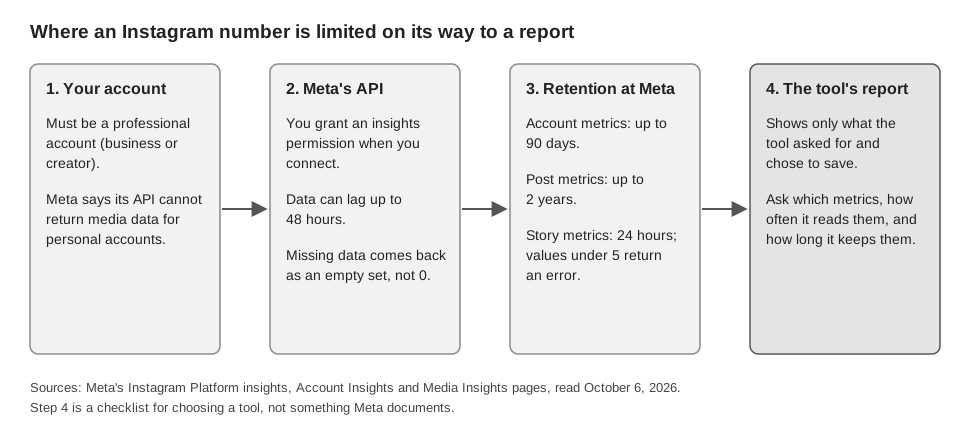
Two more facts affect how you read a tool. Meta says that if data does not exist or is unavailable, the API returns an empty data set instead of 0. And the Media Insights page warns that story metrics "may return different results for API calls, webhook notifications, and UIs."
We did not find a Meta page promising that an API figure will equal the in-app figure for the same period outside stories. So if a tool's reach differs from your Insights screen, the documentation does not tell you which is right. Metric names differ too, since Meta deprecated impressions in favor of views. Our guide to what the Instagram insights mean defines each metric and maps the in-app names to the API names.
What should you look for in Instagram analytics software?
Meta publishes no buyer's checklist, so this one is ours, built from the limits above. Check each item against a tool's own documentation or support team.
- Account type. Does it connect professional accounts, and does it support the Instagram Login route, the Facebook Page route, or both? A personal account returns no media data through the API.
- Where its Views and Impressions come from. Meta lists impressions as deprecated for the account endpoint from April 21, 2025, and for media created after July 2, 2024. Ask what a tool's "impressions" number is built from today.
- How it keeps history. Meta stores account metrics for up to 90 days. A chart that runs longer for account-level numbers is most likely built from snapshots the tool saved itself, starting from when it connected; ask which.
- How it handles stories. Story metrics are available for only 24 hours, so a tool has to capture them in that window. Ask when it reads them.
- What it shows for gaps. Because Meta returns an empty set, not 0, a careful tool shows "not available" rather than a zero.
- What happens without the insights permission. You grant permissions at connection, and a connection missing the insights one reads less. Ask what still works.
If by an Instagram tracking tool you mean link clicks, note where Meta's metrics stop. Its lists include taps on story links and a bio link click breakdown inside profile activity, but none of the metrics we read describe what a visitor does on your site afterward. That needs tracked links, covered in our guides to seeing who clicked your Instagram link and UTM naming conventions.
What does TrackMedia read from Instagram?
TrackMedia reads a small, fixed set of Instagram numbers through the same API. It connects Instagram two ways, Page-linked or as "Instagram (no Facebook Page)", and both request Meta's insights permission. TrackMedia also publishes through that API, as how to automate Instagram posts explains.
- Per post: likes and comments, plus views, reach, saves and shares.
- Per account: followers, following, post count, reach and views. Reach and views are requested with no date range, which Meta says makes the API look back 24 hours, so they are daily readings, not the 7, 30 or 90 day totals in the app.
- Engagement rate: TrackMedia's own calculation of interactions divided by reach, falling back to likes plus comments, capped at 100 percent. It is not an Instagram metric.
TrackMedia saves snapshots instead of overwriting. By design, each post TrackMedia publishes is read at about 1 hour, 24 hours and 7 days after it publishes, and account numbers are captured roughly once a day. The reads come from scheduled background jobs, so one can land late and a late job can skip an earlier stage. Meta says insights data can be delayed up to 48 hours, so the 1-hour and 24-hour readings may be low. Posts published outside TrackMedia are imported too, then re-read about once a day while they are less than 90 days old, not on the 1-hour, 24-hour and 7-day schedule. If the insights permission is missing, follower counts are still recorded and the insight numbers stay absent, not zero.
It does not request impressions, profile activity, accounts engaged, watch time, follows, audience demographics or story insights, and it does not reproduce Instagram Insights. For those, use the Instagram app. TrackMedia's analytics put the numbers it does read next to your other networks, and you can start free with TrackMedia.
How we checked this
We opened each page below in a browser on October 6, 2026 and copied limits and names from it. We did not test any analytics tool or open Insights on a live Instagram account, and we did not read any competitor's pages. We did not verify whether API figures match in-app figures beyond what Meta says about stories. The two Help Center pages were read in their computer view; each Meta page shows its own updated date below. TrackMedia's behavior comes from its Instagram connector and metrics code, read the same day. We did not check whether the scheduled jobs that take the snapshots are running in any particular deployment.
- About Instagram insights (Instagram Help Center): public-account wording, 90-day window, 100-follower and demographics thresholds, estimated metrics.
- View account and content insights on Instagram (Instagram Help Center): date range and public-account requirement.
- Instagram Platform overview (Meta for Developers, updated September 28, 2026): account types, two API configurations, access levels.
- Instagram Platform insights (Meta for Developers, updated January 21, 2025): permissions, limitations, 90-day account storage. Its sample responses still show impressions.
- Instagram Account Insights (Meta for Developers, updated June 16, 2026): metrics, 100-follower limits, 24-hour default look-back, 48-hour delay, impressions deprecation.
- Instagram Media Insights (Meta for Developers, updated September 11, 2026): 2-year storage, story limits, impressions cutoff.