You make money on Pinterest by sending people from your Pins to something that earns: a product you tag, an affiliate link, a brand partnership or your own website. Pinterest's creator pages list those four routes, and say Pinterest does not facilitate payment for monetization programs. It publishes no earnings figures.
This guide uses Pinterest's creator page on growing your audience and making money, its commercial and branded content guidelines, the help page on paid partnerships and the Pin stats page, all read on October 22, 2026. It shows how a Pin turns into a tracked sale.
Sources: growing your audience and making money · commercial and branded content guidelines · paid partnerships · Pin stats
How do you make money on Pinterest?
Pinterest lists four ways, and none pays you directly:
- Product tags. Tag products in your Pins with the product sticker, linked by keyword search or product link, so people can shop your picks.
- Affiliate links. Tag Pins with affiliate links to earn a commission on purchases. You must join an affiliate program first.
- Brand partnerships. Pinterest names five kinds: a paid partnership (monetary compensation for agreed deliverables, called the most common type), product- or service-only, user-generated content, giveaways, and trips, events or speaking engagements.
- Your website link. Put a link on your Pins to drive traffic to your own site, with outbound clicks tracked in Pin stats.
Pinterest's page says it does not facilitate payment for these programs, and that it is not part of affiliate agreements, so your commission depends on the terms you set with merchants or programs. For paid partnerships it says it "will not be directly involved in payment."
Does Pinterest pay you for views or Pins?
Not in anything we found. Pinterest's creator page gives no earnings figures, no commission rates and no follower thresholds, and it describes no payment per view. The only money paths it names go through brands, affiliate programs, products or your own site.
Treat any promise of a fixed income per Pin as unofficial. What Pinterest does publish is the performance data you can use to improve: saves, impressions, Pin clicks and outbound clicks.
What do you need to start?
- A free business account. Pinterest says you need one to access creator tools, including the paid partnership tool. You can create one or convert a personal account.
- An affiliate program, if you want affiliate tags. Pinterest says you must join one first.
- The Creator Hub, which is available only in the Pinterest mobile app.
Pin stats are also a business-account feature. Pinterest's Pin stats page says you need a business account to view them.
What are Pinterest's affiliate and disclosure rules?
Pinterest's commercial guidelines are short and specific. For affiliate links they say to:
- Generally operate only one account and make it your authentic presence.
- Make content original and useful, and be transparent about the commercial nature of your content and how your links behave.
- Use affiliate links in moderation. Creating affiliate Pins repetitively or in large volumes is not allowed.
- Not use fake accounts to save links, ask people to save your affiliate Pins in exchange for something, or ask people to create Pins with your affiliate identifier.
For paid partnerships, include a clear disclosure, such as #ad or Pinterest's paid partnership label tool. Pinterest's paid partnership page says the label is added in the Pinterest app when you create the Pin: tap the plus icon, select Pin, fill in the details, tap the arrow next to Advanced settings, turn on Add paid partnership label and tap Add a brand partner. The label cannot be added after publishing, and only one brand can be tagged per Pin. The brand must approve the tag before its name shows.
How do you track a Pin through to a sale?
A Pin does not report a sale. It reports clicks, so the sale has to be recorded where the order happens. The chain has four stages.
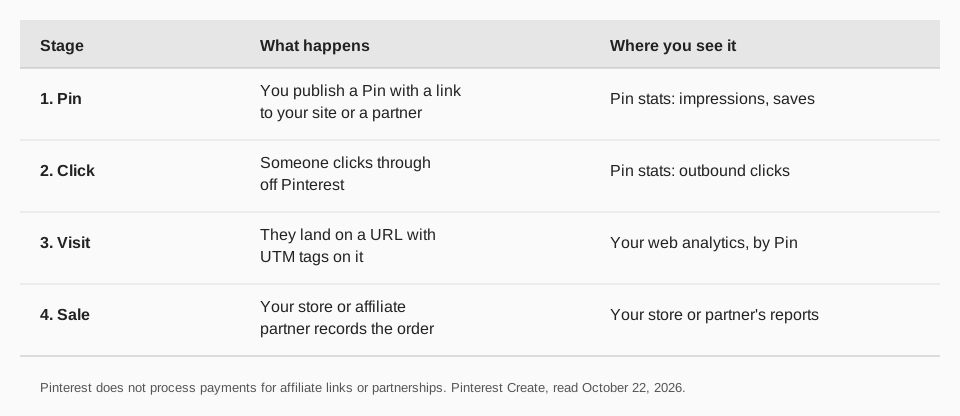
Pinterest's Pin stats page defines the numbers on the Pinterest side, including a Profile visits figure (people who visited your profile after viewing your Pin). To go beyond clicks, tag the Pin's destination link with UTM parameters, one set per Pin or campaign. Then your own analytics shows which Pin sent each visit, and your store or affiliate program shows which visits ordered. Our UTM naming conventions guide gives a pattern, and the UTM checker post helps you test a link before you publish.
How to run the Pin-to-sale loop with TrackMedia
TrackMedia is built for the repeatable part: getting Pins out on a schedule and seeing which ones send traffic.
- Publish Pins. The composer sends an image or video with a title, description, link and alt text to a board you choose, with preflight checks, alongside your other networks.
- Schedule. The calendar and posting queues keep a steady flow, and content collections fill queue slots. See how to schedule Pins on Pinterest.
- UTM tags. Real-time link tracking adds UTM tags and reports clicks, visitors and referrers per post and per network.
- Pinterest results. Impressions, saves, clicks and engagement rate come back per Pin, next to your other networks, including Pins you did not publish with us.
- Best times. A view built from your own posts shows when yours land.
By default TrackMedia leaves Pinterest links as written, so the UTM-tagged address you set is the one Pinterest sends people to. TrackMedia reports traffic, not your sales or commission, which your store or partner program records. Read how to post on Pinterest for the Pin form, then start free with TrackMedia.
Questions people also ask
Can you make money from Pinterest?
Yes, through the four routes Pinterest lists: product tags, affiliate links, brand partnerships and traffic to your website. Pinterest does not pay you directly.
Do I need a certain number of followers?
Pinterest's creator page states no follower threshold for these routes.
How much can you earn?
Pinterest publishes no earnings figures. Income depends on your affiliate terms, brand deals or sales.
Do I have to disclose affiliate links?
Pinterest's guidelines say to be transparent about the commercial nature of your content, and to use a clear disclosure such as #ad or the paid partnership label for partnerships.
How we checked this
We opened each page below on October 22, 2026. Pinterest updates its policies, so check the live page before you rely on a rule. We did not test any monetization route on a live account. TrackMedia statements come from its published features and Pinterest connector.
- How to grow your audience and make money on Pinterest (Pinterest Create): the four routes, the five partnership types, payment statements.
- Commercial and branded content guidelines (Pinterest Policy): affiliate and paid partnership rules.
- Paid partnerships for creators (Pinterest Help): label steps and limits.
- Review your Pin stats (Pinterest Help): Profile visits and the business-account requirement.