TikTok videos can be up to 10 minutes long when you record them in the TikTok app and up to 60 minutes long when you upload them in the app. TikTok's Help Center also lists a 30-minute limit for uploads on the web through TikTok Studio, so the answer depends on where you post from.
This guide uses TikTok's Camera tools, Tools for creators and Creator Rewards Program pages and TikTok for Developers, read on October 22, 2026. It also explains why you may see older numbers and what to do when your upload screen disagrees.
Sources: Camera tools · Tools for creators · Creator Rewards Program
How long can a TikTok video be?
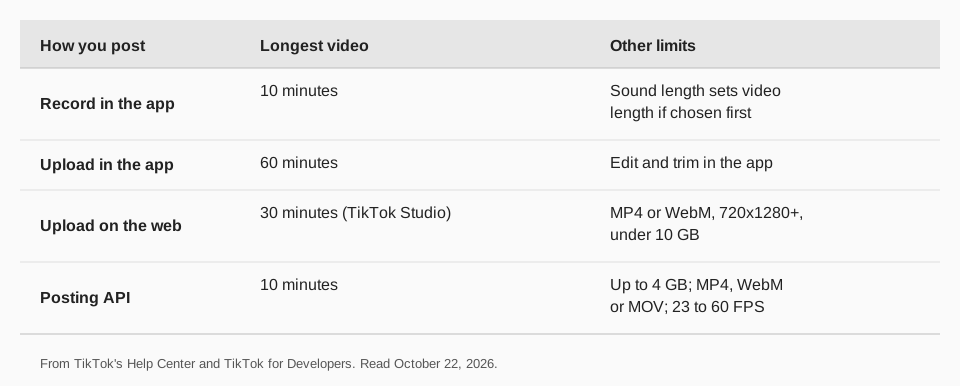
| How you post | Longest video | Source page |
|---|---|---|
| Record in the TikTok app | 10 minutes | Camera tools |
| Upload in the TikTok app | 60 minutes | Camera tools |
| Upload on the web (TikTok Studio) | 30 minutes | Tools for creators |
| Send through TikTok's posting API | 10 minutes | Media Transfer Guide |
TikTok's Camera tools page puts it in two lines: "Videos you record in TikTok can be up to 10 minutes long" and videos you upload can be up to 60 minutes long. Neither page explains why the web and app limits differ, so if your upload screen shows a different number, trust the screen.
How do you choose the length when you record?
TikTok's Camera tools page gives these steps for the app:
- Tap the Add post + button at the bottom.
- Select a length for your video.
- Tap the Record button to start and stop. Recording stops by itself when you reach the length you selected.
- Tap the Continue check button to edit your video.
One catch: if you select a sound before you record or upload, the sound's length determines the video length. If your video keeps coming out shorter than you chose, check whether a sound is attached. For the full posting walkthrough, see how to post videos on TikTok.
What are the limits when you upload on a computer?
TikTok Studio's web Upload section lists the requirements. Uploaded videos must be in MP4 or WebM format, 720x1280 resolution or higher, up to 30 minutes in length and less than 10 GB. After uploading you can add a caption, cover, who can watch, and permissions for Duet, Stitch and comments.
The Making a post page adds that a web upload sends your entire video. To change its length, upload from the TikTok app, where the editing tools are. See how to edit TikTok videos.
How long should a TikTok be?
TikTok publishes no ideal length, so we have no official number to give you. What the Help Center does document is a requirement for one program: to earn rewards in the Creator Rewards Program, videos must be at least one minute long, and the creator needs at least 10,000 followers and 100,000 video views in the last 30 days.
That is a rule for that program, not general advice. For everything else, test lengths against your own numbers in analytics. Our guide to checking TikTok analytics shows where to find views and watch data. If you also post Reels, how long an Instagram Reel can be has the same breakdown for Instagram.
Why do other sites list 1, 3 or 15 minutes?
TikTok's limit has changed over time, and old numbers stay online. TikTok's newsroom announced longer videos on July 1, 2021, describing videos of up to three minutes in the app. Many pages still repeat that or even earlier figures.
The current figures are on the Help Center pages above, but they can change again. Check your own upload screen before you plan a long video, and note that photo posts follow a different rule: TikTok says you can add up to 35 photos to a post.
How to post TikTok videos with TrackMedia
TrackMedia posts your finished video to TikTok on a schedule. Add the video to the media library, write the caption once, and TrackMedia shows a version fitted to TikTok and runs preflight checks against TikTok's limits, such as length and format, before it goes out. If the video breaks a limit, you find out in the composer instead of after a failed post.
TikTok's developer documentation sets the limit for posts sent through its API: the longest video a developer can send is 10 minutes, the maximum file is 4 GB, formats are MP4 (preferred), WebM and MOV, and frame rates run from 23 to 60 FPS. For a video longer than 10 minutes, upload it in the TikTok app.
- Post to TikTok publishes directly at the time you set.
- Send to TikTok inbox as a draft leaves the video for you to finish in the TikTok app.
- Calendar and queues hold the schedule, and a TikTok content calendar shows how to plan it.
Start free with TrackMedia (15 posts a month, one account per network, no card) and connect TikTok to see the checks yourself.
Questions people also ask
Can TikTok videos be 10 minutes long?
Yes. TikTok says videos you record in the app can be up to 10 minutes, and uploads can be longer.
Can you upload a 60-minute video to TikTok?
TikTok's Camera tools page says videos you upload in TikTok can be up to 60 minutes. TikTok Studio on the web lists 30 minutes for uploads.
How long can a TikTok video be on a computer?
TikTok Studio's web Upload section says up to 30 minutes, MP4 or WebM, 720x1280 or higher, and under 10 GB.
What is the minimum length for a TikTok video?
The pages we read give no general minimum. The Creator Rewards Program requires videos of at least one minute to qualify for rewards.
Why can't I post a long TikTok video?
The pages we read do not list a cause. Check whether you are recording or uploading, whether a sound is setting the length, and which limit applies to your posting method in the table above.
How we checked this
We opened each page below in a browser on October 22, 2026 and copied the numbers. We did not test a long upload on a live account, so your own upload screen is the final answer.
- Camera tools (TikTok Help Center): 10-minute recording and 60-minute upload limits, selecting a length, sound sets length.
- Tools for creators (TikTok Help Center): TikTok Studio web upload requirements.
- Making a post (TikTok Help Center): web upload sends the entire video; up to 35 photos.
- Creator Rewards Program (TikTok Help Center): one-minute minimum, follower and view thresholds.
- Media Transfer Guide (TikTok for Developers): API video requirements.
- More Tok on the Clock (TikTok Newsroom, July 1, 2021): the three-minute announcement.
TrackMedia's behavior comes from its TikTok connector and product pages, read the same day.