To switch to a personal account on Instagram, open your profile, tap Menu, tap Account type and tools, then Account type, Switch account type and Switch to personal account, and confirm with Switch to personal. Instagram's Help Center says you can switch back to a personal account at any time.
This guide uses Instagram's pages on switching back to a personal account, professional accounts and insights, read on October 22, 2026. It gives the steps, spells out what you lose and what you keep, and covers making the account private and connecting tools afterward.
How to switch to a personal account on Instagram
Instagram's article "Switch back to a personal Instagram account from an Instagram professional account" gives these steps for the Instagram app on Android and iPhone. It gives the same steps for iPad, except that you tap your profile picture on the left to reach your profile.
In the Instagram app (iPhone and Android)
- Open your profile. Tap Profile or your profile picture in the bottom right.
- Tap Menu in the top right. The page notes you may also need to tap Settings.
- Tap Account type and tools, then tap Account type.
- Tap Switch account type.
- Tap Switch to personal account, then tap Switch to personal to confirm.
On a computer (instagram.com)
The page has a separate tab for instagram.com, which did not load its text when we read it. A second Help Center article, on setting up a professional account, gives this path for instagram.com:
- Click More, then select Settings.
- If you have a creator account, select Creator tools and controls. If you have a business account, select Business tools and controls.
- Click Switch account type.
- Choose the account type you want to switch to, then click Switch.
If your menu looks different, search Settings for "account type". Instagram changes these screens.
What you lose when you switch to a personal account
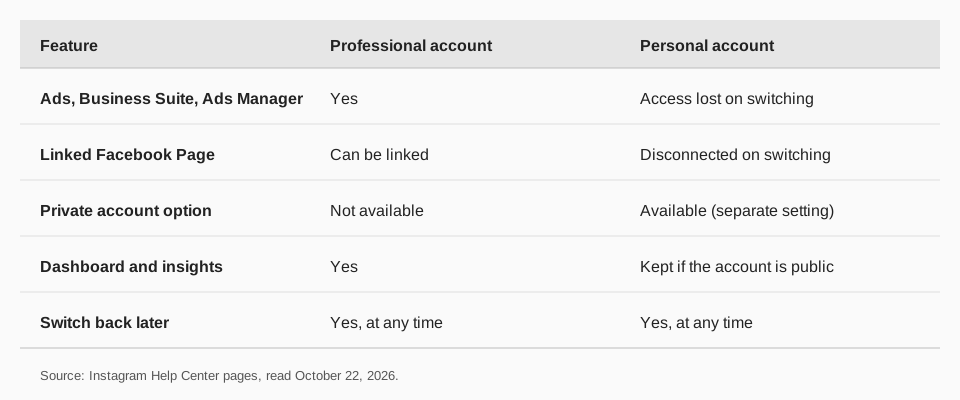
Instagram's note on the switch-back page is short: you lose access to some Meta business tools, including Meta Business Suite and Meta Ads Manager. The setup article adds that you will no longer have access to ads and may lose access to select tools, and that any Facebook Page connected to your professional account is disconnected.
Instagram's "About professional accounts" page lists what a professional account gets, which shows what is at stake:
- Professional dashboard for tracking performance and finding professional tools.
- Ads and monetization. Running ads from the account and using Meta tools to create ads that appear on Instagram and Facebook.
- Contact button and category label on the profile.
- Secondary inbox with Primary, General and Requests folders, plus ranked requests.
- Follower management tools for reviewing suspected spam and bot accounts.
- Improved discovery, where your posts and reels may appear in search engine results.
Before you switch, pause any boosted ads. Boosting is available only to professional accounts, per Instagram's insights pages, so an ad still running when the account type changes is a loose end you do not want.
Do you lose Instagram insights on a personal account?
No, if the account is public. The switch-back page says that if you have a public account you will still have access to your dashboard and insights. The reels insights page says you need a public (personal or professional) account to view reel insights.
That page adds limits: insights for reels are available for reels posted on and after May 14, 2021, and for up to two years after the original publish date. What you lose is anything that depends on a professional account, such as boosting and the Meta business tools above. For what each metric means, see our guide to what Instagram insights mean.
Can you make the account private after switching?
Yes, and this is the most common reason to switch. Instagram's page on making an account private says business profiles cannot be made private, and that to make a business account private you first switch back to a personal account. The professional-accounts page says the same: professional accounts cannot be set to private.
Switching does not turn privacy on by itself. On the Help Center page, the steps are More, then Settings, then Account Privacy below Who can see your content, then the toggle next to Private account, then Switch to private to confirm.
The reverse also applies. If your account is private and you switch to professional, Instagram makes it public and automatically accepts all pending follow requests.
One thing to weigh: Instagram's scheduling article says you need a public account to schedule posts and reels in the app. A private account is outside what that page describes.
What happens to scheduled posts and connected tools?
In-app scheduling follows your privacy setting. Instagram's article says that if you have a public account you can schedule reels, photos and carousel posts from the Instagram app, up to 25 posts a day and 30 days ahead. It does not tie scheduling to a professional account.
Tools that connect to your account are another matter. TrackMedia connects Instagram professional accounts, Business or Creator, so a personal account is not something you can connect there. Check what any other tool you use requires before you change the account type. Our guide to automating Instagram posts goes through the options.
Scheduled content is also easy to lose track of during an account change. Our guide to seeing scheduled posts on Instagram shows where they live, so you can check them before and after.
How to switch back to a professional account
Use the same menu. In the app, go to your profile, tap More to reach Settings and activity, and under For professionals tap Account type and tools, then Switch to professional account. You choose a category, then Creator or Business, and finish the optional contact and Facebook steps.
Instagram's page says the category you choose does not decide whether you get a business or creator account. That choice is the Creator or Business step.
Switching accounts and TrackMedia
TrackMedia publishes to Instagram professional accounts with a version of your post fitted to Instagram, plus carousels, first comments and alt text. It tracks clicks, visitors and referrers for the links in each post and shows them with Instagram's own post metrics in one analytics view, across all your networks.
So the rule of thumb is simple. If you want TrackMedia to schedule and measure the account, keep it professional. If you want the account private or purely personal, switch to personal and post from the app. TrackMedia still covers your other networks: the free plan gives you 15 posts a month, one account per network, with no card. Start free with TrackMedia.
If the Facebook link matters to you, note it is disconnected when you go personal. Our guide to turning off cross-posting on Instagram explains how sharing to Facebook is set up.
Questions people also ask
How do I switch to a personal account on IG?
Profile, then Menu, then Account type and tools, then Account type, then Switch account type. Tap Switch to personal account and confirm with Switch to personal. "IG" is just shorthand for Instagram, and the steps are the same.
Can I switch back to a personal account on Instagram?
Yes. Instagram's Help Center says you can switch back to a personal account at any time, and that you can also switch back to a professional one.
Will I lose followers or posts?
Instagram's pages we read do not say that followers or posts are removed. They list lost access to Meta Business Suite, Meta Ads Manager and ads, and a disconnected Facebook Page.
Can a personal account be private?
Yes. Business profiles cannot be private, but a personal account can, through the Account Privacy setting.
Does switching delete my insights?
Instagram says that with a public account you still have access to your dashboard and insights. It does not say whether insights stay visible if you also make the account private.
How we checked this
We opened each page below in a browser on October 22, 2026 and copied the menu labels. We did not test the switch on a live account, and Instagram changes its menus, so check your own screen against the labels above.
- Switch back to a personal Instagram account from an Instagram professional account (Instagram Help Center): the app steps and the note on Meta business tools, dashboard and insights.
- Set up a professional Instagram account to access business or creator tools and controls (Instagram Help Center): the instagram.com path, the note on ads and the Facebook Page, and public-by-default on switching to professional.
- About professional accounts on Instagram (Instagram Help Center): the features of a professional account and the private-account limit.
- Make your Instagram account private (Instagram Help Center): the privacy steps.
- About Instagram insights (Meta Business Help Centre) and View insights on your Instagram reels (Instagram Help Center): who can view insights.
- How to create and manage scheduled posts and Reels on Instagram (Instagram Help Center): the public-account requirement for in-app scheduling.