Instagram Instants is a feature for sending a casual photo, taken in the moment, to your Close Friends or to followers you follow back. The photo disappears after a friend views it, and nobody can view it after 24 hours. Meta announced it on May 13, 2026.
This guide is based on Meta's announcement and Instagram's own launch post, read on October 22, 2026, plus Instagram's Help Center pages on Instants. It covers how to send and view an Instant, who sees it, what is saved, how to stop receiving them, how teens are protected, and what it means for brands. It is date-stamped because the feature is new and Instagram may change it.
What is Instagram Instants?
Instagram describes Instants as a new way to share casual, everyday photos that disappear after your friends view them. The idea is unpolished, real-time sharing: you take a photo and send it, with no editing step in between.
Instagram's launch post says Instants is available globally, as a feature inside Instagram. There is also a standalone Instants app, which Instagram says is available in select countries on iOS and Android. You log in to it with your Instagram account, and Instants work the same in both apps, so an Instant sent from the app also reaches friends on Instagram.
The Help Center pages on Instants say the feature is not available on computers, and list it for the Android and iPhone apps. So you cannot send or view an Instant from instagram.com.
How the Instagram Instants feature works
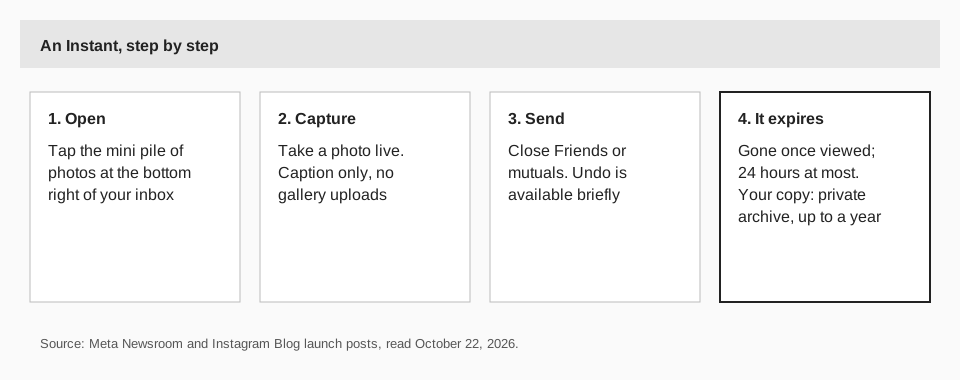
Here are the steps Instagram gives for sending an Instant from the Instagram app:
- Open your inbox. Find the mini pile of photos at the bottom right corner of the inbox and tap it.
- Take a photo in real time. You cannot upload from your gallery. The only addition allowed is a caption, and you add it before you send.
- Choose who gets it. Your options are your Close Friends or the followers you follow back (the launch post calls them mutuals).
- Tap the white button to share. An undo button appears briefly, so you can take it back.
If you use the standalone app instead, Instagram says to open the Instants app and take the photo there. The result is the same.
Who can see an Instant?
Only the people you choose from two groups: your Close Friends, or followers you follow back. Recipients can react with emojis, reply, or send an Instant back. Replies go to your direct messages, not to a public comment thread.
Instagram says recipients cannot screenshot or record an Instant you have shared. It does not say what happens if someone photographs the screen with another device, so treat an Instant as private between friends, not as a secret.
Because both groups are people you already know, an Instant cannot reach followers who do not follow you back. That matters if you run a brand account, as covered below.
How long do Instants last?
An Instant disappears once someone views it, and it cannot be viewed after 24 hours even if nobody opened it. That is the whole design.
You do keep your own copy. Instagram says your sent Instants are saved in a private archive that only you can see, for up to one year. You get to it from the top right corner of Instants. From the archive you can:
- Create a recap. Tap Create recap to compile Instants and post them to Instagram Stories. Instagram's launch post says the recap goes to all your followers, which makes it the one way an Instant reaches beyond your close circle.
- Delete an Instant. Deleting one from your archive unsends it to friends who have not opened it yet.
How to stop receiving Instants
Instagram's launch post gives a gesture for it. Hold the pile of Instants in your inbox and swipe right to stop receiving them. Hold the same spot and swipe left to bring them back.
Instagram's usual safety tools also apply. The launch post says Block, Mute and Restrict work on Instants.
Practical tips for using Instants
Based on the rules above, a few habits make Instants easier to live with:
- Set your Close Friends list first. Since you can send to Close Friends, a list you have curated means each Instant lands with the people you meant.
- Use the undo button. It appears briefly after you tap the white button, so look at the photo and caption again before the moment passes.
- Check your archive. It keeps your sent Instants privately for up to a year, so you can build a recap later.
- Snooze when you need quiet. The hold-and-swipe gesture in your inbox stops Instants arriving, and swiping the other way brings them back.
Instants and Teen Accounts
Instagram says Instants is automatically part of Teen Accounts and Family Center, with no separate setup. These details come from the launch post:
- Time on Instants counts toward a teen's daily Instagram time limit.
- Sleep Mode mutes notifications and restricts access by default from 10PM to 7AM.
- Parents of supervised teens are notified the first time their teen downloads the Instants app.
Instants vs Stories, Reels and posts
An Instant is closer to a direct message than to a post. It goes to a short list of people, leaves no public trace, and you cannot plan it. Reels, carousels and feed posts are public content you can prepare, schedule and measure.
| Question | Instants | Posts and Reels |
|---|---|---|
| Who sees it? | Close Friends or mutuals you pick | Your followers, and people who find it |
| Can you upload from your gallery? | No, camera only | Yes |
| Can you edit it? | Caption only | Yes, with the full editor |
| How long is it visible? | Gone once viewed; 24 hours at most | Stays on your profile until you remove it |
If you are choosing between formats for a message, our comparison of Reel vs Story vs post covers the public ones.
What Instants means for brands and creators
Instants is a way to keep up with your closest followers, not a way to find new ones. It cannot be scheduled (you take the photo live), it only goes to Close Friends or mutuals, and it leaves nothing on your public profile unless you post a recap.
Two practical uses follow from the rules. A creator can send behind-the-scenes photos to a Close Friends list of the most engaged followers. A small business owner can use the recap to put a day's Instants into a Story that all followers see. Neither replaces your planned content.
For the public side of your Instagram, consistency is still the lever. Our Instagram content calendar guide shows how to plan a month, and how to post reels on Instagram covers the format Instagram promotes to new audiences.
Planning Instagram content around Instants with TrackMedia
TrackMedia is where you plan the content that Instants does not cover. You write one post and TrackMedia fits a version to Instagram: feed posts, Reels and carousels, with first comments and alt text, scheduled from a calendar and a posting queue. Instants stay in the Instagram app, since they are taken live and sent to a small list.
What you can measure is the public side. TrackMedia tracks the links in your posts in real time, with UTM tags, so you see clicks, visitors and referrers per post and per network. Its analytics also include Instagram's own metrics, so you can check whether the days you send Instants line up with more engagement on the posts you plan. The same account covers 21 networks, with a free plan of 15 posts a month and no card. Start free with TrackMedia.
If you want Stories on the calendar, see whether you can schedule Instagram Stories, which sets out what Instagram's own tools allow.
Questions people also ask
What is the Instagram Instants feature?
A way to take a photo in the moment and send it to Close Friends or mutuals. It disappears after it is viewed and cannot be viewed after 24 hours.
Can you screenshot an Instant?
Instagram says recipients cannot screenshot or record Instants.
Can you send photos from your camera roll?
No. Instagram says you cannot upload from your gallery. You take the photo in real time and can add a caption only.
Is Instants a separate app?
Both. It is a feature inside Instagram, available globally, and a standalone Instants app in select countries that uses your Instagram login.
Can I use Instants on a computer?
No. Instagram's Help Center pages list Instants for the Android and iPhone apps and say it is not available on computers.
How we checked this
We opened each page below on October 22, 2026. The Help Center pages loaded their device notices but not their step text for us, so the steps and limits come from the announcement pages. Instagram may change Instants, so check the live pages.
- Introducing Instants: A New Way to Share in the Moment (Meta Newsroom, May 2026): how to send, recipients, expiry, archive, recap, undo, snooze, teens, safety tools, app availability.
- Introducing Instants: Share in the Moment on Instagram (Instagram Blog): the sending steps, the recap audience and the archive.
- About Instants by Instagram and Share photos instantly with others in your inbox on Instagram (Instagram Help Center): device availability.